Showing posts with label tlterm. Show all posts

Thursday, March 13, 2025

Software Training available

 You can purchase professional training from us for

✅TLex Lexicography Software

✅tlTerm Terminology Software

✅tlCorpus

✅tlDatabase

as you need!🧑‍🎓

Book anything from an hour, to days of training! Whatever suits your needs and budget.

Training can be presented via Zoom, Teams, Skype, and many other suitable online platforms. (If you need on-site training, contact us for a quote that covers travel.)

We have presented Software Training internationally for many users of TLex/tlTerm, including Oxford University Press, EC Department of Education (2024), PanSALB National Lexicography Units, university departments, the Malaysian Institute of Languages and Literature (DBP - Dewan Bahasa dan Pustaka), and more. (Training is presently available in English.)

If you book enough hours for it, we can also (if desired) use some of the time to help with tasks such as initial project customization (e.g. studying your requirements and start helping with aspects like setting up required fields for your projects, or styles.)

Questions? Contact us. Book now:

https://tshwanedje.com/order

Wednesday, February 22, 2023

New OpenAI GPT integration for new TLex, tlTerm, tlCorpus, tlDatabase, tlReader - AI-augmented lexicography

The new TLex ,tlTerm, tlCorpus, tlDatabase:

● Improve productivity & augment lexicography & terminology work with new OpenAI GPT integration (shown here entries auto-created by #GPT *)


● Use it for checking grammar, creating sample definitions, examples, sense lists, and much more


We are excited to announce a new version of TLex, tlTerm, tlCorpus, tlDatabase and tlReader are now available, featuring integration with the OpenAI API. This integration can help to speed up lexicography and terminology and other work, augment language work and dictionary compilation with AI, and make the lexicography process more efficient and effective.


The OpenAI API is a powerful tool that can be used to generate natural language, perform language translation, and even create new language models. With this integration, TLex users can take advantage of these capabilities to improve their language work and create more accurate and comprehensive dictionaries.

Some of the new features that the OpenAI API integration brings to TLex include:

  • Faster generation of draft language translation, allowing for more efficient dictionary compilation across multiple languages.
  • The ability to generate natural language descriptions of entries, making it easier to write clear and concise definitions.


To try the latest version of TLex is now available for download from our website. We encourage you to explore the new capabilities that this integration provides and share your feedback with the community.

As always, thank you for your continued support of TLex. We are dedicated to providing the most powerful and effective lexicography software available, and we believe that this new OpenAI API integration will help to take our software to the next level.

* Note that OpenAI integration requires the use of your own OpenAI "API key", and that this is a third-party service (we are not responsible for the content generated, nor affiliated with OpenAI.) These AI language models are still research models, and may generate incorrect info, especially with less-frequently-spoken languages, so the content needs checking, though can be very useful to speed up and augment all language work.


Friday, December 31, 2021

Monterey on Apple M1 releases of TLex, tlCorpus, tlTerm, tlDatabase, tlReader

 TLex, tlCorpus, tlTerm on Monterey on Apple M1 🙂

Monterey macOS users can download our Monterey release (for Monterey Macs on Apple M1 processors) via this link (also for tlDatabase, tlReader):

https://tshwanedje.com/builds/mac64/

(Click the link for 'Monterey M1' if your Mac is M1-based, or if your Mac is Intel-based click the 'macOS11 Intel' link. If you're not sure if your Mac is Intel or M1-based, click the Apple menu logo, select "About This Mac" and check the "Chip".)
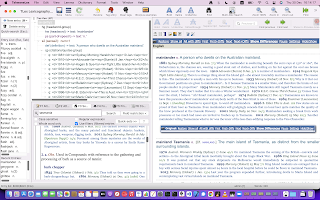
TLex on Monterey on Apple M1 with the Australian National Dictionary (a large, wonderfully done dictionary of Australianisms, full of interesting colloquialisms and historical citations)

Note this special new release (v3046 or higher) is built directly for Apple M1 processors & shouldn't need Apple's Rosetta virtualization to run, so Mac users on M1 can get the most performance-wise from their M1.

This is in addition to our normal Mac release line, i.e. we have both our current official Intel-based Mac release AND new M1 (ARM) release, alongside each other.

In future we may either combine these into a single download ("Universal" version), or we might continue to maintain two separate downloads (for M1/ARM, and Intel/Rosetta).

In principle, our Intel-based official download should run automatically under Apple's Rosetta, though on Monterey it has a problem, which this new release should solve - if you're on Monterey on M1, use this new release - if not, use the normal official Mac download.

Please report any problems, suggestions or other feedback, and please let us know if you experience any other compatibility problems (e.g. with Monterey on Intel or other operating system versions like Big Sur). Also let us know if it does work for you.

Always back up your data before trying new versions.
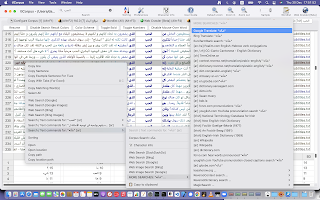

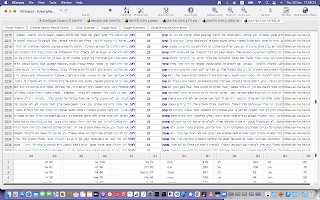
tlCorpus corpus software on Monterey on Apple M1 with Arabic (subtitles corpus)

TLex lexicography software (Mac Monterey version running on Apple M1), showing the WAT (Woordeboek van die Afrikaanse Taal - a beautiful massive Afrikaans dictionary being edited in TLex)

tlCorpus on Monterey on Apple M1 with Hebrew (subtitles corpus)

Our applications support all languages and run on Mac and Windows. Find out now how they can help you with creating, editing, managing, analyzing, or publishing or distributing your language or other data and projects at: tshwanedje.com/


Sunday, February 11, 2018

Valentine's Day Software Update ❤ Coming Up

We're preparing a new 'Valentine's Day Update' ❤ 💾 (to be released 14 February*) that adds extra new features for version 2018 of tlTerm #terminology software, TLex #lexicography software etc.

* This has now been released - the release announcement is here: Valentine's Day Software Update 2018

The screenshot shows upgraded Microsoft Word integration functionality, new Excel integration, and also shows (in the new Multi-Document Smart-Search), amongst others, auto-searching in TMX files (Translation Memory eXchange, here using EU science hub open TMX files for demonstration purposes) and TBX/XLIFF files, and also shows the OERTB 11-lingual South African Open Educational Resource TermBank within tlTerm.


(This potentially allows, for example, a TLex/tlTerm user to 'at their fingertips' access and see search results from within large Translation Memory's like the downloadable EU TMX data, while they work, either from within TLex/tlTerm or the Word/Excel plugin popup window. You can also e.g. load in your organization's own Translation Memory's or e.g. XLIFF or TBX (TermBase eXchange) data to this 'Multi-Document Smart-Search'.)

TLex/tlTerm users will be able to get the update by simply using the usual methods for installing updates (e.g. the "Help/Check for updates" menu.)

Watch this video for a 6-minute overview of tlTerm (and effectively TLex also):
https://www.youtube.com/watch?v=YXoSXET9sxo

If you have questions, please contact us.

To purchase, click here: http://tshwanedje.com/store/

To try the software, click here: http://tshwanedje.com/downloads/

Video explaining the main difference between TLex and tlTerm: https://youtu.be/VKCMx7IrgIc

#ValentinesDay

Tuesday, January 2, 2018

Version 2018 of TLex, tlTerm, tlCorpus and tlDatabase Released (and January Promotion)

We're pleased to announce Version 2018 of TLex, tlTerm, tlCorpus and tlDatabase have been released 🙂 
🎉
See the ChangeLog on our website for what's new, or download a trial version from our website.


We're also running from 1 Jan until 31 January 2018 only a 15% discount promotion - NB, this is unfortunately for SHAREIT orders only, use coupon code V2018JAN on the ShareIt order form (i.e. if you go to our website at http://tshwanedje.com/store/ and then click through at the big step "1" and use the ShareIt shopping cart).


Monday, July 17, 2017

Volume License Discounts

New volume license (bulk purchase) discounts are now available for the following products: TLex, tlTerm, tlCorpus and tlDatabase. Click here for more details: http://tshwanedje.com/store/

Friday, July 15, 2016

Version 2016 RC (Release Candidate) released of TLex, tlTerm, tlCorpus and tlDatabase

We've released Version 2016 RC1 (Release Candidate 1) of TLex Suite, tlTerm, tlCorpus and tlDatabase. This is a pre-release leading up to a formal Version 2016 release in the near future.

All existing users' licenses will be upgraded to the latest version automatically and for free (existing license numbers can be used to activate either version 2016 or version 2013). (Users currently on version 2013 or earlier are advised to update to version 2016. You do not need to do anything 'special' to upgrade - if you follow the 'usual' instructions for updating, you will automatically receive version 2016 RC on your next update.)

For a detailed list of what's new, please see the changelog: http://tshwanedje.com/support/changelog

Version 2016 RC1 includes over 130 new features since the last major release of our software.
We'll also soon be announcing significant new functionality in TLex Online (online dictionary/terminology publishing platform), and our electronic dictionary publishing platform also now includes a sophisticated "self-building" system that allows clients/publishers to build new releases of their electronic dictionaries themselves.


Please contact us if you have any inquiries.

Wednesday, October 29, 2014

New Online Terminology Lists

We've published new searchable versions of the Microsoft Terminology lists for many languages:

http://tlterm.com/

Languages so far include: Catalan, Chinese, Czech, Danish, Dutch, Estonian, Finnish, French, German, Gujarati, Hungarian, Italian, Swedish, Welsh, Japanese, K'iche', Konkani, Korean, Malay, Maori, Polish, Portuguese, Portuguese (Brazil), Russian, Sinhala, Tamil, Telugu, Thai, Albanian, Belarusian, Tigrinya, Kinyarwanda, Afrikaans, Northern Sotho, Setswana, Xhosa, Zulu.


We plan to supplement these searchable terminology lists with more languages and more terminology data in future (and plan to possibly allow TLex and tlTerm users to easily publish their own data here too).

These terminology lists are published using TLex Online - contact us if you want to publish any reference works using this customizable and flexible platform.

Tuesday, October 14, 2014

Free Upgrades Extended Through 2016 for tlTerm, TLex, tlDatabase and tlCorpus

We have extended automatic free upgrades for all users of the following products through to at least 'version 2016':
• TLex Suite
• tlTerm
• tlCorpus
• tlDatabase

This means that if you own a license for any of these products, you will be able to upgrade to the latest version through 2015 and 2016 (as these future versions become available - note, the current version remains 'version 2013'). (You can upgrade to the latest at any time by using the "Help / Check for updates" menu command, then following the instructions. New features and improvements are integrated into the latest updates continually.)

These free upgrades apply to all users of these software products, including those going all the way back to the early 2003 versions of TshwaneLex (now TLex Suite). Your existing 9-digit License Number should continue to "just work" for activating the latest version (provided it is for the right product line).

(If you have lost your activation details, you may be able to retrieve them via this link if you still have the same email address - or alternatively, contact us if you need assistance recovering old activation details.)


Wednesday, May 21, 2014

Notice for ODBC Users of TLex, tlTerm and tlDatabase

To users of TLex, tlTerm or tlDatabase using ODBC with PostgreSQL: It is recommended that you upgrade to the latest Windows PostgreSQL ODBC driver:

http://www.postgresql.org/ftp/odbc/versions/msi/

This driver (version "09_03_03" 17 May 2014) incorporates a fix (that we implemented and submitted to the PostgreSQL developers) for a reliability issue that may occur if you are working on an unreliable network (e.g. periodic network disconnects, or high packet loss).

We also recommend ODBC users upgrade to the very latest version of TLex (or tlTerm etc.), as we have been working on many improvements to make it more robust on unreliable networks.

Sunday, May 11, 2014

New Tutorial Video: Filter (F5) "Node intersection" Mode (TLex, tlTerm, tlDatabase)

A new tutorial video is available:

https://www.youtube.com/watch?v=U_7LKmiw5f0


This describes the basic Filter (F5) 'modes', in particular', the recently introduced 'Node intersection' mode.

This applies to TLex, tlTerm, and tlDatabase.

Wednesday, April 30, 2014

Beta program news: New 'Web layout engine' option Chromium Embedded Framework (CEF3)

For those relatively more advanced users (of TLex) who don't mind trying out the latest ('bleeding-edge') changes, we have some important changes we would like some help testing. We have a 'beta' release line of the Windows version of TLex Suite that includes generally some of the newest changes not yet rolled into our 'official' builds ... these beta releases are linked at the bottom of the TLex Suite download page on our website. The latest beta version (version .1213 or higher) includes a new 'Web layout engine' ('HTML window provider') that we'd like early public testing on (this is the 'Web browser engine' that drives the Preview Area and various other windows within the software). The new Web layout engine is called CEF3 (Chromium Embedded Framework), and it's based on basically the same open source engine underlying the Chrome browser.

This should fix the small-caps display problem if using the wxWebkit option, and the 'invisible cursor' problem some users have if using the Internet Explorer option. It's also a generally more capable 'browser engine' that is going to allow us to add a lot more 'interesting' functionality in the Preview Area and elsewhere in the near future.

If you've installed the new beta version, CEF3 is not yet selected by default, so to test it out, run TLex (or tlTerm), select the menu option 'View / HTML window provider / CEF3', then restart TLex (or tlTerm). Ideally, that should be all you need to do - everything else should then just continue to work 'as is'. Please report any problems to us.

TLex Suite Download Page:
http://tshwanedje.com/downloads/download.php?app=TLexSuite

The following Knowledge Base articles may also be of relevance:
http://tshwanedje.com/kb/4
http://tshwanedje.com/kb/7

Note also we are still offering beta program sign-ups here: http://tshwanedje.com/beta

Thursday, November 21, 2013

TLex Suite 2013 released - free upgrade available

TLex Suite 2013, tlTerm 2013 (Standalone), tlCorpus 2013 (Standalone) and tlDatabase 2013 are now available. There are over 150 new features and improvements.

All users have been upgraded free to version 2013. (See 'how to upgrade' below.)


Survey

• We'd like to hear from you what are the main new features or other improvements you'd like to see from us - please complete our customer survey: http://tshwanedje.com/survey/

Looking Ahead: Version 2014

• Upgrades will remain free for the upcoming version 2014

• We have many new features on the cards for version 2014, including 'edit-in-Preview' functionality, LanguageTool spellchecker integration, and much more. Other ideas in the pipeline include possible 'cloud' multi-user editing or 'instant online' dictionary publishing services with our TLex Online platform. Watch the ChangeLog, or follow our blog, Twitter, or Facebook pages.

Need a Custom Feature?

• We gladly add new features on request, and regularly do so for our customers (this is typically quoted at our hourly programming rate). One of our strengths is our rigorous automated software build and test processes that allow a potentially fast turn-around time for integrating requested changes - for small feature additions, it can theoretically be as quick as 24 hours from request of feature, to being in the official release and on the customer's "desk"! So contact us for a quote if there's anything, big or small, you'd like added.

• Just a reminder we also offer paid support. Pre-paid 'support packs' can be purchased on our website.

• Free tutorial videos are also available on our website, and we also offer paid training via the Web or on-site.

How to Upgrade

• To upgrade, use 'Help / Check for updates' from within the software and follow the instructions, or download the latest via the 'Downloads' section of our website. (As always, back up your data first.)

• License Numbers will work for both v2012 (or earlier) and v2013. If you already have v2012 installed, you can upgrade without re-activating.

• Version 2013 remains backwards-compatible with all previous releases going back to version 1, so no users have been 'left behind' - all users can update to version 2013.

Tuesday, November 12, 2013

Attention Apple Mavericks Users

If you are using TLex, tlCorpus, tlTerm or tlDatabase on the new Apple "Mavericks", we would like to draw your attention to the following issue that you may encounter: http://tshwanedje.com/kb/1; the bug is seemingly in Apple Mavericks itself (not in our software), and the workaround for now is to disable "Cover Flow mode" in Finder (the issue only occurs if you are using Cover Flow mode). Windows users are not affected.

Sunday, May 26, 2013

Software Tutorial Videos

Just a reminder to our users, free online tutorial videos are available for our software. (We've also recently added high-quality versions that can be downloaded for offline viewing or distribution here.)

Feel free to distribute these as widely as you like.

Sunday, June 17, 2012

Version 2012 (and free upgrades) now available

Version 2012 of the following products is now available, and all 9-digit License Numbers have been updated for free to this latest version:
For a list of new features in these releases, please see the ChangeLog. There are well over 100 new features and improvements since the release of version 2010.

The procedure for obtaining the upgrade is as follows:
  1. Go to our website's 'downloads' section
  2. Select the relevant product download page for your license
  3. Click on the download link, and follow the installation and activation instructions
If you don't know your 9-digit License Number(s), you can use the "Software License Recovery" tool accessible from the 'Support' section of our website, or from the downloads page. Alternatively, you may contact us to obtain your license numbers. (The 9-digit License Number allows you to automatically activate the software when installing. ALL customers' licenses have previously been assigned these 9-digit License Numbers.)

Please note that version 2012 is still backwards-compatible with ALL previous releases of our software going all the way back to version 1, so no users have been 'left behind' - all users can update to the latest versions.

Note that, as always, we recommend making a backup of your data before upgrading.

Sunday, May 20, 2012

TLex 10th Birthday - Free Giveaways and Upgrades!

Happy Birthday
(Update 5 June 2012: Entries are now closed for the free software giveaways. The free TLex Suite 2012 upgrades will still apply.)


Monday 21 May 2012 marks 10 years since the first lines of code were laid down for the TLex Dictionary Compilation Software Suite (and thus, tlTerm, tlDatabase, tlCorpus). To celebrate this tenth "birthday", we are giving away the following free products and upgrades!


• 10x free TLex Suite (Lexicography) (full, unlimited version) apply here (TLex) »
• 10x free tlTerm Standalone (Terminology) apply here (tlTerm) »
• 10x free tlCorpus Standalone (Corpus Work) apply here (tlCorpus) »
• 10x free tlDatabase apply here (tlDatabase) »
• 10x free Swahili - English Electronic Dictionary apply here (SWAHILI) »
• 10x free Zulu - English Electronic Dictionary apply here (Zulu) »
• 10x free paperback 'Oxford Northern Sotho - English / English - Northern Sotho Dictionary (South Africans only) apply here (N. Sotho) »


(Applications close at midnight on Sunday 27 May 2012, GMT. Anyone may apply, including businesses.  See below for conditions *.)


Free Upgrade for ALL USERS to TLex Suite 2012


We also hereby pre-announce the upcoming TLex Suite 2012, and we will in the near future be giving away automatic free upgrades to version 2012 for ALL existing TLex (TshwaneLex), tlTerm, tlDatabase and tlCorpus users!


(Please feel free to continue buying from our online store - even though it currently still says 'version 2010', do not worry, you will be upgraded for free to version 2012!)


This will help clear up some of the "which version am I on?" confusion experienced by some users, and simplify the downloading and upgrading experience.


Please note that TLex Suite 2012 will be capable of loading dictionary database files from ALL older versions of TLex / TshwaneLex.


To obtain your free upgrade (NB: NOT AVAILABLE YET - this will be rolled out in the coming months), simply use the "Help/Check for updates" menu option as usual - once your license gets upgraded on our system, it should thereafter automatically redirect you to version 2012. Your existing 9-digit licenses numbers will still be applicable. (If you don't know your 9-digit license number, please use this form or contact us.)


Improvements in Version 2012


Improvements in version 2012 include performance and reliability improvements to the ODBC multi-user support, Mac ODBC support, a new 'Copy field' feature, 'Watch Folders' for auto-importing, various new command-line parameters for more advanced application control and scripting, new error checks, improvements to the Character Tool, and more. Improvements to tlCorpus include support for HTML files, Microsoft Word and PDF files (Windows-only), and various additional new commands. (See the changelog for more details.)


* Giveaway Conditions:
  • The 'Oxford Northern Sotho - English / English - Northern Sotho Bilingual Dictionary' offer is only available for South Africans (you must supply a physical address). The free copies are '1st revision'.
  • You may enter in multiple categories (e.g. for both tlTerm and TLex Suite).
  • Maximum one entry per category allowed.
  • Entries will be selected at random, but final discretion lies with TshwaneDJe. No correspondence will be entered into in this regard.
  • Software licenses given away under this promotion have no free support included.
  • You must provide all necessary contact details.

Friday, July 1, 2011

New tutorial videos

Several new free tutorial videos have been posted on our YouTube channel:
http://www.youtube.com/user/tshwanedje

Note for those with YouTube blocked, these can also be downloaded for offline viewing here: http://tshwanedje.com/videos/

Wednesday, June 29, 2011

tlTerm 2011 Standalone Available

tlTerm 2011 Standalone is now available!

New features include more fine-grained privileges, new error check filters, improvements to the Character Information tool, new command-line options, new XML merge options, new Watch Folders functionality, DTD editor improvements, and a tool for deleting all tagged entries at once.

tlTerm is available for both Windows and Mac.

Existing tlTerm Standalone users will also get a free upgrade to the latest version. Also, this is a partial pre-release, meaning more features are still to come!

Monday, March 7, 2011

New Tutorial Videos for TLex, tlTerm, tlCorpus, tlDatabase

We have a brand new YouTube channel with free online tutorial and 'tips and tricks' videos for TLex (TshwaneLex), tlTerm, tlDatabase and tlCorpus!

http://www.youtube.com/user/tshwanedje

Please do subscribe and keep an eye on the channel, as we'll be adding more videos soon. Let us know if there are any particular topics you'd like to see covered.

We also offer Web-based training for all our software, contact us if you are interested.