Showing posts with label corpus. Show all posts

Thursday, March 13, 2025

Software Training available

 You can purchase professional training from us for

✅TLex Lexicography Software

✅tlTerm Terminology Software

✅tlCorpus

✅tlDatabase

as you need!🧑‍🎓

Book anything from an hour, to days of training! Whatever suits your needs and budget.

Training can be presented via Zoom, Teams, Skype, and many other suitable online platforms. (If you need on-site training, contact us for a quote that covers travel.)

We have presented Software Training internationally for many users of TLex/tlTerm, including Oxford University Press, EC Department of Education (2024), PanSALB National Lexicography Units, university departments, the Malaysian Institute of Languages and Literature (DBP - Dewan Bahasa dan Pustaka), and more. (Training is presently available in English.)

If you book enough hours for it, we can also (if desired) use some of the time to help with tasks such as initial project customization (e.g. studying your requirements and start helping with aspects like setting up required fields for your projects, or styles.)

Questions? Contact us. Book now:

https://tshwanedje.com/order

Friday, December 31, 2021

Monterey on Apple M1 releases of TLex, tlCorpus, tlTerm, tlDatabase, tlReader

 TLex, tlCorpus, tlTerm on Monterey on Apple M1 🙂

Monterey macOS users can download our Monterey release (for Monterey Macs on Apple M1 processors) via this link (also for tlDatabase, tlReader):

https://tshwanedje.com/builds/mac64/

(Click the link for 'Monterey M1' if your Mac is M1-based, or if your Mac is Intel-based click the 'macOS11 Intel' link. If you're not sure if your Mac is Intel or M1-based, click the Apple menu logo, select "About This Mac" and check the "Chip".)
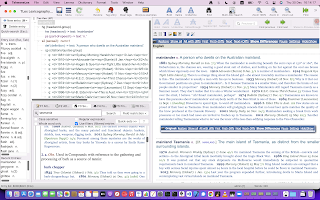
TLex on Monterey on Apple M1 with the Australian National Dictionary (a large, wonderfully done dictionary of Australianisms, full of interesting colloquialisms and historical citations)

Note this special new release (v3046 or higher) is built directly for Apple M1 processors & shouldn't need Apple's Rosetta virtualization to run, so Mac users on M1 can get the most performance-wise from their M1.

This is in addition to our normal Mac release line, i.e. we have both our current official Intel-based Mac release AND new M1 (ARM) release, alongside each other.

In future we may either combine these into a single download ("Universal" version), or we might continue to maintain two separate downloads (for M1/ARM, and Intel/Rosetta).

In principle, our Intel-based official download should run automatically under Apple's Rosetta, though on Monterey it has a problem, which this new release should solve - if you're on Monterey on M1, use this new release - if not, use the normal official Mac download.

Please report any problems, suggestions or other feedback, and please let us know if you experience any other compatibility problems (e.g. with Monterey on Intel or other operating system versions like Big Sur). Also let us know if it does work for you.

Always back up your data before trying new versions.
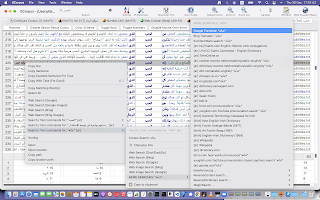

tlCorpus corpus software on Monterey on Apple M1 with Arabic (subtitles corpus)

TLex lexicography software (Mac Monterey version running on Apple M1), showing the WAT (Woordeboek van die Afrikaanse Taal - a beautiful massive Afrikaans dictionary being edited in TLex)

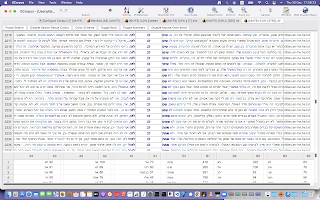
tlCorpus on Monterey on Apple M1 with Hebrew (subtitles corpus)

Our applications support all languages and run on Mac and Windows. Find out now how they can help you with creating, editing, managing, analyzing, or publishing or distributing your language or other data and projects at: tshwanedje.com/


Friday, March 30, 2018

Easter Update available with new features for TLex, tlTerm: XLIFF, TMX, spellchecking, Excel import

Our Easter Update for TLex (lexicography), tlTerm (terminology software), tlDatabase (any kind of data), tlCorpus (concordance software) is now officially available.

New features include integrated spell-checking (Windows-only for now), a new Preview Area toolbar, Excel importer, TMX mode (open and view Translation Memory eXchange documents), XLIFF mode (open and view XML Localisation Interchange File Format documents), 'generic XML mode' in which one can open any XML document, bulk-import/convert data from TMX or XLIFF to tlTerm, a new extensions system, and more right-to-left (Arabic/Hebrew/Yiddish etc.) improvements.

Video of What's New in the Feb+Mar 2018 updates (and, a sneak preview of some new functionality for a future update):

https://www.youtube.com/watch?v=Sj4fb6lGkGc

We have also posted several new tutorial videos, including one showing briefly how to set up the spell-checking, and a new general 'Getting Started with tlTerm' tutorial video.

Note we also have a (very) informal development live-stream where you can check out development.

All existing users may update for free. To try it out, just update the usual way, e.g. 'Help/Check for updates' etc. (unless you're on a special version of TLex). If your version number under Help/About ends in .2000 or higher, you have the Easter Update. Send us any feedback or bug reports.

Tuesday, January 2, 2018

Version 2018 of TLex, tlTerm, tlCorpus and tlDatabase Released (and January Promotion)

We're pleased to announce Version 2018 of TLex, tlTerm, tlCorpus and tlDatabase have been released ðŸ™‚ 
🎉
See the ChangeLog on our website for what's new, or download a trial version from our website.


We're also running from 1 Jan until 31 January 2018 only a 15% discount promotion - NB, this is unfortunately for SHAREIT orders only, use coupon code V2018JAN on the ShareIt order form (i.e. if you go to our website at http://tshwanedje.com/store/ and then click through at the big step "1" and use the ShareIt shopping cart).


Sunday, June 17, 2012

Version 2012 (and free upgrades) now available

Version 2012 of the following products is now available, and all 9-digit License Numbers have been updated for free to this latest version:
For a list of new features in these releases, please see the ChangeLog. There are well over 100 new features and improvements since the release of version 2010.

The procedure for obtaining the upgrade is as follows:
  1. Go to our website's 'downloads' section
  2. Select the relevant product download page for your license
  3. Click on the download link, and follow the installation and activation instructions
If you don't know your 9-digit License Number(s), you can use the "Software License Recovery" tool accessible from the 'Support' section of our website, or from the downloads page. Alternatively, you may contact us to obtain your license numbers. (The 9-digit License Number allows you to automatically activate the software when installing. ALL customers' licenses have previously been assigned these 9-digit License Numbers.)

Please note that version 2012 is still backwards-compatible with ALL previous releases of our software going all the way back to version 1, so no users have been 'left behind' - all users can update to the latest versions.

Note that, as always, we recommend making a backup of your data before upgrading.

Thursday, June 24, 2010

tlCorpus Beta Available!

We are currently signing up beta testers for tlCorpus, our new standalone concordance software application. Beta testers will get a free copy of the software. The program is open to anyone interested. You can apply online by clicking here.