Showing posts with label tlDatabase. Show all posts

Friday, December 31, 2021

Monterey on Apple M1 releases of TLex, tlCorpus, tlTerm, tlDatabase, tlReader

 TLex, tlCorpus, tlTerm on Monterey on Apple M1 🙂

Monterey macOS users can download our Monterey release (for Monterey Macs on Apple M1 processors) via this link (also for tlDatabase, tlReader):

https://tshwanedje.com/builds/mac64/

(Click the link for 'Monterey M1' if your Mac is M1-based, or if your Mac is Intel-based click the 'macOS11 Intel' link. If you're not sure if your Mac is Intel or M1-based, click the Apple menu logo, select "About This Mac" and check the "Chip".)
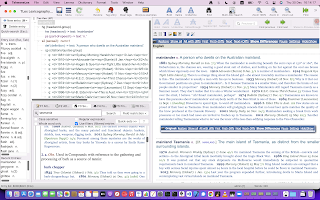
TLex on Monterey on Apple M1 with the Australian National Dictionary (a large, wonderfully done dictionary of Australianisms, full of interesting colloquialisms and historical citations)

Note this special new release (v3046 or higher) is built directly for Apple M1 processors & shouldn't need Apple's Rosetta virtualization to run, so Mac users on M1 can get the most performance-wise from their M1.

This is in addition to our normal Mac release line, i.e. we have both our current official Intel-based Mac release AND new M1 (ARM) release, alongside each other.

In future we may either combine these into a single download ("Universal" version), or we might continue to maintain two separate downloads (for M1/ARM, and Intel/Rosetta).

In principle, our Intel-based official download should run automatically under Apple's Rosetta, though on Monterey it has a problem, which this new release should solve - if you're on Monterey on M1, use this new release - if not, use the normal official Mac download.

Please report any problems, suggestions or other feedback, and please let us know if you experience any other compatibility problems (e.g. with Monterey on Intel or other operating system versions like Big Sur). Also let us know if it does work for you.

Always back up your data before trying new versions.
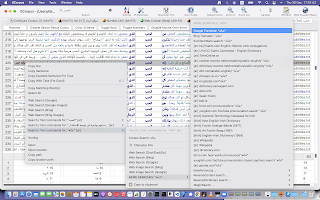

tlCorpus corpus software on Monterey on Apple M1 with Arabic (subtitles corpus)

TLex lexicography software (Mac Monterey version running on Apple M1), showing the WAT (Woordeboek van die Afrikaanse Taal - a beautiful massive Afrikaans dictionary being edited in TLex)

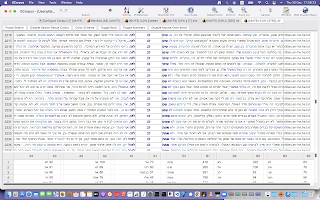
tlCorpus on Monterey on Apple M1 with Hebrew (subtitles corpus)

Our applications support all languages and run on Mac and Windows. Find out now how they can help you with creating, editing, managing, analyzing, or publishing or distributing your language or other data and projects at: tshwanedje.com/


Friday, March 30, 2018

Easter Update available with new features for TLex, tlTerm: XLIFF, TMX, spellchecking, Excel import

Our Easter Update for TLex (lexicography), tlTerm (terminology software), tlDatabase (any kind of data), tlCorpus (concordance software) is now officially available.

New features include integrated spell-checking (Windows-only for now), a new Preview Area toolbar, Excel importer, TMX mode (open and view Translation Memory eXchange documents), XLIFF mode (open and view XML Localisation Interchange File Format documents), 'generic XML mode' in which one can open any XML document, bulk-import/convert data from TMX or XLIFF to tlTerm, a new extensions system, and more right-to-left (Arabic/Hebrew/Yiddish etc.) improvements.

Video of What's New in the Feb+Mar 2018 updates (and, a sneak preview of some new functionality for a future update):

https://www.youtube.com/watch?v=Sj4fb6lGkGc

We have also posted several new tutorial videos, including one showing briefly how to set up the spell-checking, and a new general 'Getting Started with tlTerm' tutorial video.

Note we also have a (very) informal development live-stream where you can check out development.

All existing users may update for free. To try it out, just update the usual way, e.g. 'Help/Check for updates' etc. (unless you're on a special version of TLex). If your version number under Help/About ends in .2000 or higher, you have the Easter Update. Send us any feedback or bug reports.

Tuesday, October 14, 2014

Free Upgrades Extended Through 2016 for tlTerm, TLex, tlDatabase and tlCorpus

We have extended automatic free upgrades for all users of the following products through to at least 'version 2016':
• TLex Suite
• tlTerm
• tlCorpus
• tlDatabase

This means that if you own a license for any of these products, you will be able to upgrade to the latest version through 2015 and 2016 (as these future versions become available - note, the current version remains 'version 2013'). (You can upgrade to the latest at any time by using the "Help / Check for updates" menu command, then following the instructions. New features and improvements are integrated into the latest updates continually.)

These free upgrades apply to all users of these software products, including those going all the way back to the early 2003 versions of TshwaneLex (now TLex Suite). Your existing 9-digit License Number should continue to "just work" for activating the latest version (provided it is for the right product line).

(If you have lost your activation details, you may be able to retrieve them via this link if you still have the same email address - or alternatively, contact us if you need assistance recovering old activation details.)


Wednesday, May 21, 2014

Notice for ODBC Users of TLex, tlTerm and tlDatabase

To users of TLex, tlTerm or tlDatabase using ODBC with PostgreSQL: It is recommended that you upgrade to the latest Windows PostgreSQL ODBC driver:

http://www.postgresql.org/ftp/odbc/versions/msi/

This driver (version "09_03_03" 17 May 2014) incorporates a fix (that we implemented and submitted to the PostgreSQL developers) for a reliability issue that may occur if you are working on an unreliable network (e.g. periodic network disconnects, or high packet loss).

We also recommend ODBC users upgrade to the very latest version of TLex (or tlTerm etc.), as we have been working on many improvements to make it more robust on unreliable networks.

Sunday, May 11, 2014

New Tutorial Video: Filter (F5) "Node intersection" Mode (TLex, tlTerm, tlDatabase)

A new tutorial video is available:

https://www.youtube.com/watch?v=U_7LKmiw5f0


This describes the basic Filter (F5) 'modes', in particular', the recently introduced 'Node intersection' mode.

This applies to TLex, tlTerm, and tlDatabase.

Thursday, November 21, 2013

TLex Suite 2013 released - free upgrade available

TLex Suite 2013, tlTerm 2013 (Standalone), tlCorpus 2013 (Standalone) and tlDatabase 2013 are now available. There are over 150 new features and improvements.

All users have been upgraded free to version 2013. (See 'how to upgrade' below.)


Survey

• We'd like to hear from you what are the main new features or other improvements you'd like to see from us - please complete our customer survey: http://tshwanedje.com/survey/

Looking Ahead: Version 2014

• Upgrades will remain free for the upcoming version 2014

• We have many new features on the cards for version 2014, including 'edit-in-Preview' functionality, LanguageTool spellchecker integration, and much more. Other ideas in the pipeline include possible 'cloud' multi-user editing or 'instant online' dictionary publishing services with our TLex Online platform. Watch the ChangeLog, or follow our blog, Twitter, or Facebook pages.

Need a Custom Feature?

• We gladly add new features on request, and regularly do so for our customers (this is typically quoted at our hourly programming rate). One of our strengths is our rigorous automated software build and test processes that allow a potentially fast turn-around time for integrating requested changes - for small feature additions, it can theoretically be as quick as 24 hours from request of feature, to being in the official release and on the customer's "desk"! So contact us for a quote if there's anything, big or small, you'd like added.

• Just a reminder we also offer paid support. Pre-paid 'support packs' can be purchased on our website.

• Free tutorial videos are also available on our website, and we also offer paid training via the Web or on-site.

How to Upgrade

• To upgrade, use 'Help / Check for updates' from within the software and follow the instructions, or download the latest via the 'Downloads' section of our website. (As always, back up your data first.)

• License Numbers will work for both v2012 (or earlier) and v2013. If you already have v2012 installed, you can upgrade without re-activating.

• Version 2013 remains backwards-compatible with all previous releases going back to version 1, so no users have been 'left behind' - all users can update to version 2013.

Tuesday, November 12, 2013

Attention Apple Mavericks Users

If you are using TLex, tlCorpus, tlTerm or tlDatabase on the new Apple "Mavericks", we would like to draw your attention to the following issue that you may encounter: http://tshwanedje.com/kb/1; the bug is seemingly in Apple Mavericks itself (not in our software), and the workaround for now is to disable "Cover Flow mode" in Finder (the issue only occurs if you are using Cover Flow mode). Windows users are not affected.

Sunday, May 26, 2013

Software Tutorial Videos

Just a reminder to our users, free online tutorial videos are available for our software. (We've also recently added high-quality versions that can be downloaded for offline viewing or distribution here.)

Feel free to distribute these as widely as you like.

Friday, July 1, 2011

New tutorial videos

Several new free tutorial videos have been posted on our YouTube channel:
http://www.youtube.com/user/tshwanedje

Note for those with YouTube blocked, these can also be downloaded for offline viewing here: http://tshwanedje.com/videos/

Monday, March 7, 2011

New Tutorial Videos for TLex, tlTerm, tlCorpus, tlDatabase

We have a brand new YouTube channel with free online tutorial and 'tips and tricks' videos for TLex (TshwaneLex), tlTerm, tlDatabase and tlCorpus!

http://www.youtube.com/user/tshwanedje

Please do subscribe and keep an eye on the channel, as we'll be adding more videos soon. Let us know if there are any particular topics you'd like to see covered.

We also offer Web-based training for all our software, contact us if you are interested.

Monday, December 27, 2010

tlDatabase 2011 Beta now available

tlDatabase 2011 pre-release is now officially available! tlDatabase brings the power of the TLex editor to other types of data.

We're accepting beta sign-ups here.

We expect similar announcements soon for tlCorpus 2011, tlTerm 2011 and TLex Suite 2011, on which development is already progressing quickly; stay tuned.

Just a reminder also that purchases for tlDatabase and tlCorpus will automatically be upgraded through to versions 2012.

We've also made further improvements to our activation system; activating software should henceforth be much simpler.

Monday, March 22, 2010

tlDatabase Beta Testing Program Now Open!

We are now signing up beta testers for tlDatabase, our XML-based database software for editing any kind of structured content in a user-friendly way. The goal behind tlDatabase is to bring much of the power that TLex brings to dictionary editing, into other arenas.

Beta testers will obtain a free license of the software. The program is open to anybody who is interested, and there is no cost involved. You can apply online by clicking here.